What are the best iPad Applications?

With the introduction of Apple's iPad, an entirely new set of applications is on the rise. No longer does the iPhone rule the world of apps. Now the iPad shares in this phenomenon. From the best iPad games, productivity apps, business apps to the most noteworthy iPad apps for entertainment, everyday use and social networking, the iPad has the best apps available on the market. In this blog we will list the best, most widely adopted iPad applications. We use each and every one of the apps we critique to make sure they are worthy of praise. All technology is welcome - we just happen to think that the iPad is the best portable app driven, web surfing hand held device bar none. So, give us feedback, let us know about your favorite app and let's move forward with innovation and app fun.
Showing posts with label best ipad apps. Show all posts

Saturday, June 19, 2010

Google Earth | Top Apple iPad App

iPad apps have the incredible potential to change the way we access information and Google knows it. Google Earth has long been a staple for the website search engine, and has made it's way to the iPad App Store. The best thing about Google Earth for iPad is the great display of images and the ease of use. G. Earth for iPad has most of the features of the web based version, but with added simplicity of the iPad interface. When searching for locations on the app, you can turn on or off features such as places, businesses, panoramio photos, wikipedia, borders and labels, roads, and terrains in "layers". Google makes a great application even better with the addition of "My Maps" which allows the app to sync with you Google maps account. This great new iPad app is one that we use and love.


The Google Earth iPad app receives a A +

What could be better?
  • Not Much! Great App!

Friday, April 16, 2010

Dragon Dictation | Top Apple iPad App


Dragon Dictation has been one of the leading dictation softwares for some time. The Apple iPad version brings all of the great tools of this top of the line transcription software to the portability of the iPad. This app gives users the ability to speak directly into the iPad microphone and have a very accurate transcription take place in only moments. We have used this application many many times and love it. This iPad app is extremely easy to use - simply tap the record button, speak and tap the screen when finished. In seconds you will have text that you can use in email, Pages document or any other application that accepts copy & paste functions. The best thing about Dragon Dictation for the iPad is that its absolutely free. 


The Dragon Dictation iPad app receives a A -
What could be better?
  • Less crashes
  • Support for offline transcription

Thursday, April 8, 2010

iBooks - Top Apple iPad App


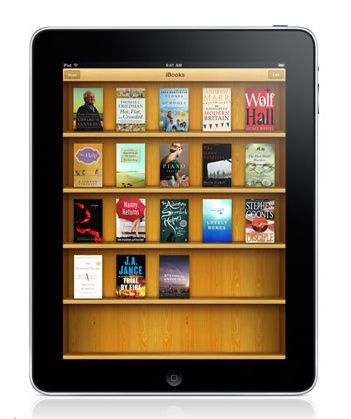
With the innovation of the Apple iPad, we see a whole new realm of mobile application use. Obviously, the iPad allows us to have a better visual representation of what we need to do through productivity apps and also have a mobile entertainment device capable of browsing the Internet, communicating with others, as well as reading our favorite book. One of the top Apple iPad applications is the iBooks application. With iBooks, users are given the ability to read, store, and purchase new books in a whole new way. This Apple iPad app is a great addition to the Apple family. Purchasing books is extremely easy. With a built in store to purchase your favorite books, the iPad's iBooks application gives us the ability to get back in the habit of reading. We have tested the iBooks application in many different scenarios, and found that user readability, ease of use, and simplicity are some of the key benefits of this iPad app. IBooks is great for viewing and reading your favorite fiction book, nonfiction book, and even some selected textbooks. We love the idea of carrying our books in one device. The iPad has revolutionized this process. Many other readers do not offer the amount of functions that the iPad and iBooks do. IBooks interface is simple and elegant. Books are displayed on a wooden bookshelf with the face of each book clearly visible. This makes browsing the books in iBooks easy and carefree. The ability to sample books is also very useful. Often times reading a few pages first can give us a better idea if we would like to purchase that book. Navigating through iBooks is simple. This great Apple iPad app gives us the ability to turn pages as if reading a real book. All in all we give the iPad iBooks application a great rating. This e-book reader is the first of its kind. Offering full-color pages, easy navigation, and a great way to purchase your books on the go.

The iBooks iPad app receives a A +
What could be better?
  • More textbooks